
Available as a free demo or for real money at partner casinos, Chicken Road 2 appeals to both newcomers exploring crash-style games and regulars seeking a straightforward multiplier climb without complex bonus features. In this review, we break down the multiplier structure, difficulty settings, interface controls, payout ceiling and practical strategies to help you decide whether this sequel deserves a place in your rotation.
Chicken Road 2: key facts
| Provider | InOut |
|---|---|
| Type | Browser-based crash game |
| RTP | Not disclosed |
| Volatility | Variable (four selectable tiers) |
| Min / max bet | £0.50 minimum (upper limit set by operator) |
| Max win | Not specified |
| Mobile | Browser-compatible |
| Demo | Yes |
A polished, skill-tinged multiplier game that rewards patience and timing, though the absence of published RTP and modest visual variety may leave some players wanting more.
What is Chicken Road 2?
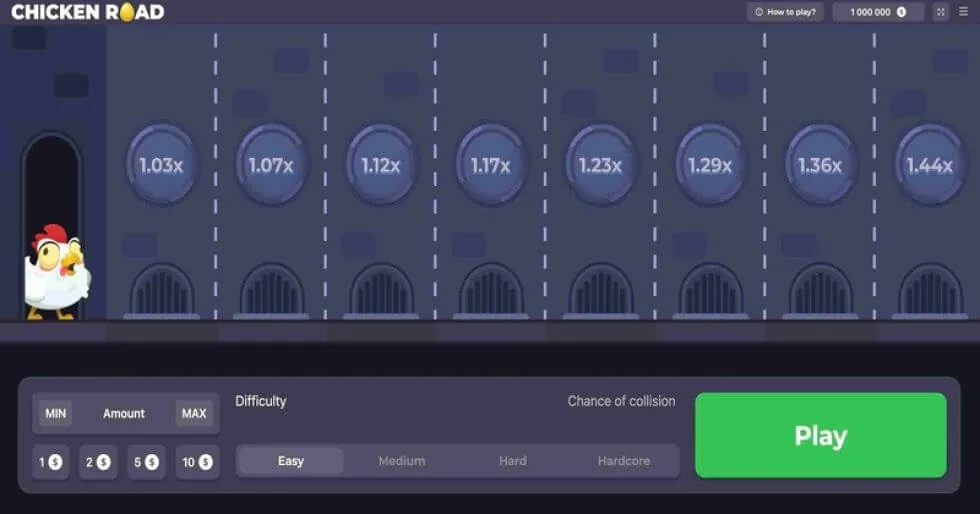
Chicken Road 2 is a browser-based crash game in which you steer a chicken avatar across a multi-lane road, dodging oncoming vehicles to build a multiplier that compounds with every successful crossing. Developed by InOut, it sits alongside the original Chicken Road in the studio's catalogue, sharing the same traffic-navigation premise but distinguished by altered scenery, revised vehicle patterns and a different visual layout. The game opens with your chicken positioned at the roadside, and each forward move places it in the path of a turquoise car that sweeps horizontally across the lane. Time your advance correctly and the lane's multiplier is applied to your stake; mistimed, and the round ends immediately with no payout.
Four difficulty modes—Easy, Medium, Hard and Hardcore—govern the total number of lanes you must cross and the density of traffic. Easy mode presents 30 lanes with more generous spacing, while Hardcore compresses the challenge into 18 lanes and tighter vehicle intervals. The game defaults to Medium, which offers 25 lanes and strikes a middle ground that most players find approachable. Circular manhole icons on each lane display your current multiplier in real time, so you always know your standing before committing to the next step. A live-wins feed runs along the top of the interface, showing recent payouts from other participants, and an online counter confirms active users, reinforcing the sense that you are part of a broader community rather than playing in isolation.

How to play Chicken Road 2
1: Set your wager and choose difficulty
The control strip at the base of the screen presents four preset bet buttons—£0.50, £1, £2 and £7—rendered in dark grey with pale borders and white numerals. Click your preferred stake, then select one of the four difficulty tiers from the adjacent menu. Medium is preselected and highlighted with a lighter shade, but you can switch to Easy, Hard or Hardcore before each round. Higher difficulties reduce the total lane count and increase vehicle frequency, raising collision risk in exchange for a steeper multiplier curve. Once your wager and tier are locked in, press the prominent green 'Play' button to begin.
2: Advance the chicken lane by lane
Your white chicken avatar—complete with a five-point crimson comb, matching wattle, triangular orange beak and bright yellow legs—stands ready at the start zone. Click the forward control to move it into the first lane, where a turquoise car travels horizontally. If you time the crossing to avoid contact, the lane's multiplier (beginning at 1.01× for lane one) is applied to your stake, and the circular manhole icon updates to reflect your new total. You can activate 'Space to spin and go' in the settings menu to use the Space key for quicker lane advances, a feature that suits players who prefer rhythmic keyboard input over repeated mouse clicks.
3: Cash out or continue
After each successful lane, you face a decision: collect your current multiplier and end the round with a guaranteed payout, or push forward to the next lane in pursuit of a higher factor. The multipliers compound as you progress—lane six, for example, carries a 1.19× boost, but reaching it means you have already banked the increments from lanes one through five. A single collision with the moving car forfeits your entire stake for that round, so the deeper you venture, the more you stand to lose. The live-wins feed and your visible balance (shown with a gold coin icon and space-separated thousands) help you gauge momentum and decide when to lock in profit.
How much can you win?
Chicken Road 2 does not publish a fixed maximum win ceiling, so your potential return depends on the difficulty tier you select, how many lanes you successfully navigate, and the compounding effect of the multipliers. Lane one applies a modest 1.01× factor, and each subsequent lane adds its own increment—lane six, for instance, delivers 1.19×. Because these multipliers stack, reaching deeper lanes produces exponentially higher totals. A player who crosses all 30 lanes in Easy mode will collect a significantly larger payout than one who stops after six lanes, but the trade-off is heightened exposure to collision risk over a longer sequence.
The four difficulty tiers reshape this dynamic by altering lane count and traffic density:
- Easy mode offers 30 lanes with sparser vehicle flow, allowing a steadier multiplier climb and lower per-lane risk.
- Medium mode reduces the total to 25 lanes and tightens traffic intervals, raising collision likelihood while still offering substantial payout scope.
- Hard mode restricts you to 22 lanes and introduces denser vehicle patterns, demanding sharper timing under increased pressure.
- Hardcore mode compresses the challenge into 18 lanes with maximum traffic density, delivering the steepest risk-reward curve for experienced players.
Strategies and good habits
Master the traffic rhythm before raising stakes
Spend several demo rounds observing the turquoise car's movement pattern and lane width. Each difficulty tier alters vehicle speed and spacing, so what works in Easy mode may fail in Hard. Practise advancing through the first six lanes consistently before committing larger wagers, and resist the temptation to raise your bet immediately after a win—multiplier games reward steady observation over impulsive escalation.
Set a cash-out target and respect it
Decide in advance how many lanes you intend to cross or what multiplier threshold will trigger your exit, then stick to that plan. The compounding structure makes it easy to chase 'just one more lane', but a single mistimed move erases all progress. If you reach your target multiplier, collect your payout rather than gambling for a marginal increment—consistency over many rounds beats occasional deep runs that end in collision.
Use the Space key for rhythm and precision
If you enable 'Space to spin and go' in the settings menu, you can advance through lanes with a single keystroke instead of repeated mouse clicks. This keyboard shortcut helps establish a steady tempo and reduces the lag between decision and execution, particularly useful in higher difficulty tiers where vehicle intervals are tighter. However, ensure you are comfortable with the pace before activating this feature, as rapid-fire advances can lead to unintended collisions if your timing is off.
Free demo or real money?
Chicken Road 2 offers a free demo accessible directly from the game's landing page, with no account registration or payment method required. The demo version replicates the full interface, difficulty tiers and multiplier mechanics, giving you unlimited virtual currency to explore each setting and refine your timing. This risk-free environment is ideal for beginners learning the traffic patterns and for regulars testing new cash-out strategies before committing real funds. The only limitation is that demo payouts cannot be withdrawn—once you are confident in your approach, you will need to switch to real-money mode at a partner casino.
Real-money play unlocks the ability to convert successful rounds into withdrawable winnings, but it also introduces the standard risks inherent to all gambling games. Multiplier mechanics like Chicken Road 2's are designed to return less than 100 per cent of total wagers over time, so even skilled timing cannot guarantee profit in the long run. Set a session budget before you begin, treat losses as the cost of entertainment, and remember that responsible gambling practices—taking breaks, avoiding chasing losses, and never wagering more than you can afford to lose—apply regardless of game type. This is an 18+ activity, and if you feel your play is becoming problematic, seek support from organisations such as GamCare or BeGambleAware.
Our opinion
Chicken Road 2 delivers a focused, skill-tinged multiplier experience that rewards patient observation and disciplined cash-out discipline. The four difficulty tiers provide genuine variety, letting you calibrate risk and lane count to match your mood or bankroll, and the compounding multiplier structure creates clear decision points at every step. The interface is clean and uncluttered, with real-time multiplier displays, a live-wins feed and an online counter that foster a sense of community without overwhelming the central gameplay. The white chicken avatar is rendered with surprising anatomical care—its crimson comb, yellow legs and looping idle animation add personality to what could have been a generic placeholder—and the circular manhole icons serve as effective visual markers for progress.
However, the game is not without its limitations. InOut has not published an RTP figure, leaving players to guess at the long-term return and making it harder to compare Chicken Road 2 with other crash or multiplier titles that disclose their percentages. The visual refresh from the original Chicken Road amounts to altered scenery and revised traffic patterns rather than a fundamental redesign, so players seeking dramatic innovation may find the sequel's improvements incremental. The absence of a stated maximum win ceiling also complicates planning, as you cannot benchmark your ambitions against a fixed target. Despite these gaps, Chicken Road 2 remains a solid choice for anyone drawn to crash-style games that blend reflexes with risk management, and the free demo ensures you can evaluate its pace and difficulty before staking real money.
👍 Pros
- Four difficulty tiers let you tune lane count and traffic density to your preference.
- Compounding multipliers create clear, transparent decision points with every lane.
- Free demo available with no registration, ideal for practice and strategy testing.
- Live-wins feed and online counter add social proof and a sense of shared activity.
- Keyboard shortcut option (Space key) supports faster, more rhythmic play.
👎 Cons
- No published RTP, making it difficult to assess long-term return or compare with competing titles.
- Visual and mechanical updates from the original Chicken Road are modest rather than transformative.
- Lack of a stated maximum win ceiling leaves payout potential ambiguous.
Frequently asked questions
What is the RTP of Chicken Road 2?
InOut has not disclosed an RTP figure for Chicken Road 2. Without this percentage, you cannot confirm the theoretical return over time, so approach the game with the understanding that all multiplier mechanics are designed to favour the house in the long run.
Can I play Chicken Road 2 on mobile?
Yes. Chicken Road 2 is a browser-based game that adapts to mobile screens, so you can play on smartphones and tablets without downloading a dedicated app. Performance depends on your device's specifications and browser, but the interface is designed for touch input.
How do the difficulty tiers work?
Chicken Road 2 offers four tiers—Easy (30 lanes), Medium (25 lanes), Hard (22 lanes) and Hardcore (18 lanes). Higher difficulties reduce the total lane count and increase vehicle density, raising collision risk while compressing the multiplier climb into fewer steps. The multiplier values themselves remain constant across all tiers.
Is there a maximum win limit?
InOut has not specified a maximum win ceiling for Chicken Road 2. Your potential payout depends on the difficulty tier, the number of lanes you cross, and the compounding multipliers, but individual operators may impose their own withdrawal caps.
Do I need to create an account to try the demo?
No. The Chicken Road 2 demo is accessible without registration or payment details, giving you unlimited virtual currency to explore the game's mechanics and difficulty settings risk-free.